Learn exactly how to prompt Veo 3.1 Lite for cinematic results. Covers shot types, camera movement, audio, and 20+ copy-paste prompts across genres — no fluff.
TL;DR — What makes a Veo 3.1 Lite prompt work
Start with a shot type (Close-up., Wide shot., Medium shot.), add one camera move (dolly in, crane shot rising), describe subject and scene, and close with an SFX: or Ambient: line. Keep the prompt to 3–6 sentences. The single most impactful change is front-loading the shot type — it controls how the model frames everything that follows.
Veo 3.1 Lite isn't a chatbot — it's a video director waiting for a shot brief. Vague prompts produce generic footage. Specific, structured prompts produce clips that actually look like something you intended.
The model was trained on cinematic data and responds to film-making language: shot types, camera movements, lens specifications, lighting conditions. Use those terms and you get dramatically better output than describing what you want in plain English.
This guide treats prompting as cinematography, not copywriting.
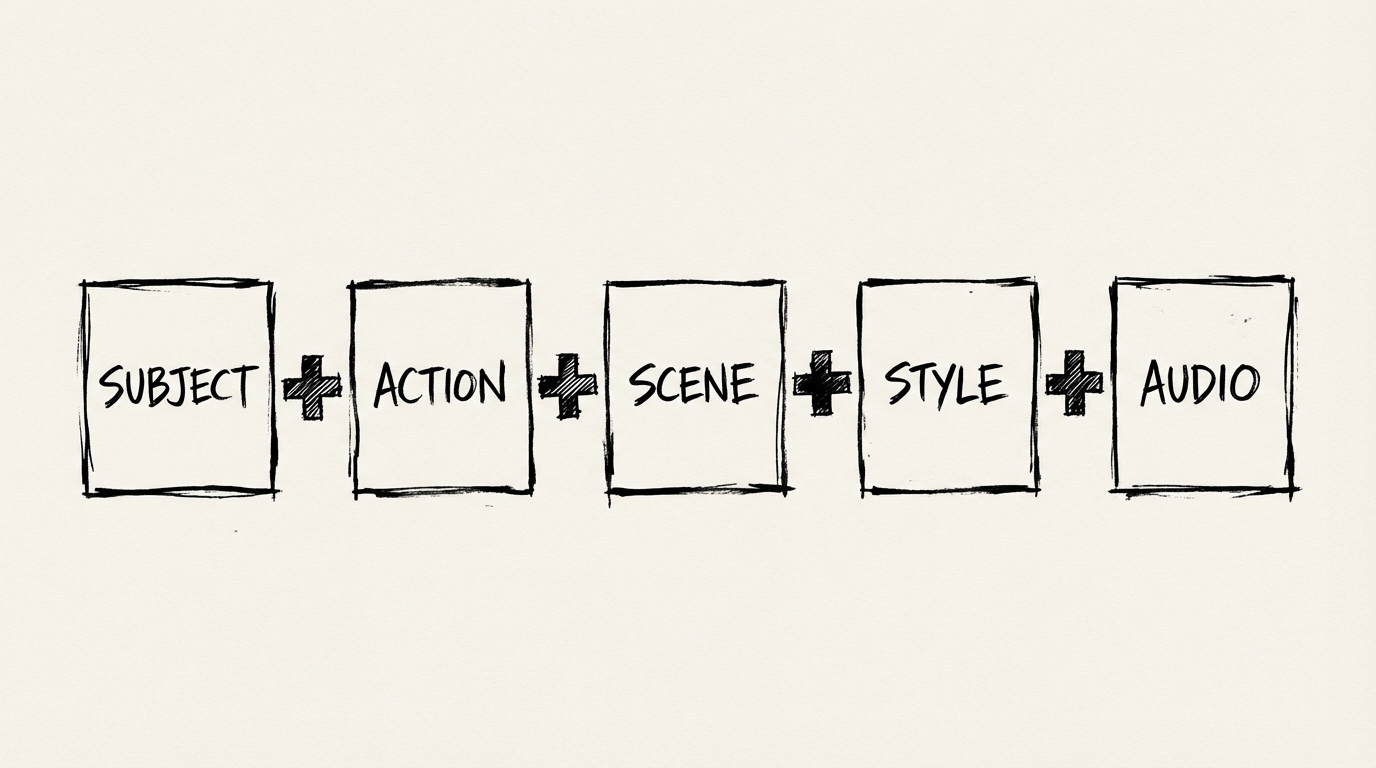
Every strong Veo 3.1 Lite prompt contains these five elements:
| Ingredient | What It Controls | Example |
|---|---|---|
| Subject | Who/what is the focus | a woman in her 40s, silver bob haircut |
| Action | What is happening | walks slowly through the frame |
| Scene | Where and when | rainy Tokyo street at night, neon reflections on wet pavement |
| Style | Visual aesthetic | cinematic 35mm film grain, shallow depth of field |
| Audio | Sound design | SFX: rain and distant traffic, no music |
You don't need all five every time. But the more you specify, the more control you get.
Weak prompt:
A woman walking in a city at night.
Strong prompt:
Medium shot. A woman in her 40s with a silver bob walks slowly through a rainy Tokyo street at night. Neon signs reflect on wet pavement behind her. She glances sideways at the camera once. 35mm film grain, shallow depth of field. SFX: rain, distant traffic, heels on wet concrete.
Same subject. Completely different result.
Always front-load your shot type. Veo 3.1 Lite reads the first sentence first — if you bury the framing instruction at the end, it often gets ignored.
| Shot Type | Abbreviation | Best For |
|---|---|---|
| Extreme close-up | ECU | Texture, emotion, single detail |
| Close-up | CU | Face, expression, intimacy |
| Medium shot | MS | Conversation, waist-up action |
| Wide shot | WS | Environment, establishing scale |
| Extreme wide shot | EWS | Epic landscapes, isolation |
Examples:
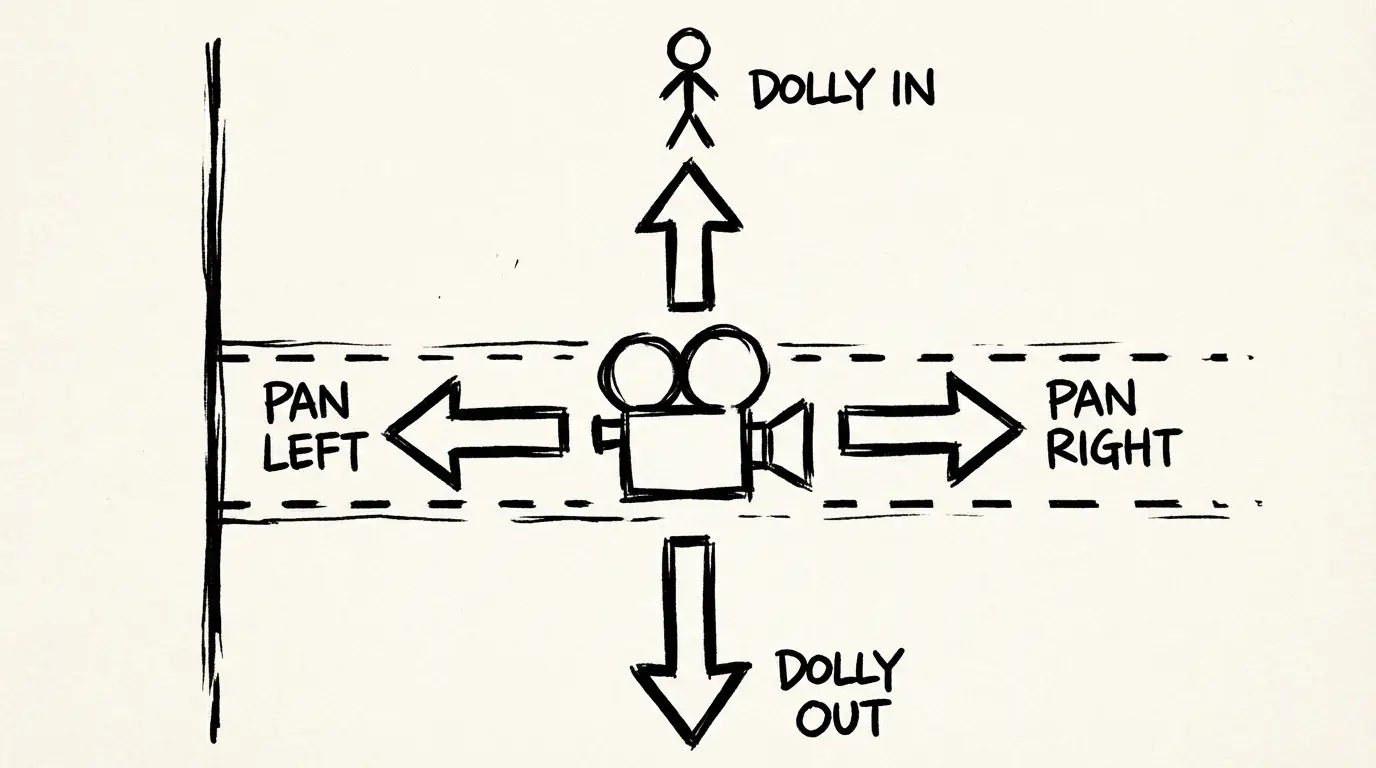
If you don't specify camera movement, Veo defaults to a static or slightly floating frame. That's fine for close-ups, but it makes wider shots feel lifeless.
The rule: one primary camera move per clip. Stacking movements confuses the model.
| Movement | Effect | Use When |
|---|---|---|
| dolly in | Moves toward subject | Building tension, revealing emotion |
| dolly out | Moves away from subject | Reveals scale, ending a scene |
| pan left / pan right | Rotates horizontally | Following movement, scanning environment |
| tracking shot | Follows the subject | Running scenes, chase sequences |
| crane shot rising | Camera lifts upward | Epic reveal, transition out |
| dolly zoom | Dolly + zoom opposite | Disorientation, psychological tension |
Write the camera as its own sentence:
Lenses control depth and emotional distance more than any other variable.
| Lens | Feel | When to Use |
|---|---|---|
| 16mm wide angle | Expansive, distorted edges | Architecture, landscapes, action |
| 35mm | Natural, slightly intimate | Documentary, street, conversation |
| 50mm | True-to-eye perspective | Neutral, versatile |
| 85mm portrait | Compressed background, intimate | Character portraits, emotion |
| telephoto 200mm | Very compressed, surveilling | Surveillance feel, wildlife |
Example using lens language:
Veo 3.1 Lite generates native audio automatically — but what it generates depends entirely on what you specify. Without audio prompting, you get a generic ambient mix. With it, you get something intentional.
Three audio elements you can control:
Wrap speech in quotation marks and attribute it:
Prefix with SFX: and be specific:
Use Ambient: or describe the soundscape in the scene:
Copy these directly into the generator. Each one is tested on the Veo 3.1 model family.
1. Multiple simultaneous actions A man runs across a rooftop while checking his phone and shouting into the wind. The model can't handle three competing actions. Pick one dominant action per clip.
2. Vague group sizes A crowd of people causes geometry instability. Use: a small group of colleagues or three people for stable multi-person scenes.
3. Negative instructions without positive alternatives No buildings in the background often fails. Instead: a desolate field with no structures in sight.
4. Stacking camera moves Dolly in while panning left and tilting up produces unstable motion. One move per clip.
5. No framing instruction Skipping the shot type means the model chooses. It usually picks medium. If you want anything else, specify it.
This breakdown covers real examples of what separates weak from strong prompts on Veo 3.1:
The difference between a weak Veo 3.1 Lite prompt and a strong one is cinematography language, not prompt length. A 30-word prompt using a shot type, a single camera move, and an SFX: line will consistently outperform a 200-word description that doesn't use film vocabulary.
If you're using image-to-video specifically, see the dedicated Veo 3.1 Lite Image-to-Video Guide for product photo input tips and I2V-specific prompt templates.
All the prompts above work with Veo 3.1 Lite. At 20 credits for 8 seconds, you can run 5 test variations for 100 credits to find what works before committing to a final render.
→ Open Veo 3.1 Lite Generator — paste any prompt above and generate in seconds on Veo 4.0.
Prompt examples and technique guidance are based on Google's official Veo 3.1 prompting documentation and community testing. Results may vary across model tiers.
Page-specific visual proof
This page now includes owned media examples and in-body links so readers can move from search intent into a relevant UndressMe AI creation path.
Current guide: Veo 3.1 Lite Prompt Guide: 20+ Ready-to-Use Prompts for Cinematic AI Video
REFINE RESULTS
Dedicated generators for distinct visual outcomes.
Start from a look, then choose the matching workflow.
Start with the look, then reuse the same character direction across photos, prompts, and motion.
Move the strongest still image into a short visual clip once the style is stable.
Help crawlers and readers move between transactional, visual, anime, and safety pages.
A broader in-body crawl path across the current SEO page set.
Use these as proof-rich paths from girlfriend intent into image, video, and prompt workflows.


Google launched Veo 3.1 Lite on March 31, 2026 — the most affordable model in the Veo family at $0.05/sec for 720p. Here's what it can do, what it can't, and whether it's right for your workflow.

How to use Veo 3.1 Lite's image-to-video mode to create product demos, social media content, and brand videos from still photos — with real examples and workflow tips.

Google Veo 4 launched in April 2026 with storyboarding, 10–30 second clips, multi-angle generation, and real-time editing. Here's what it can do, how it compares to Veo 3.1, and whether it's right for your workflow.